
I’ll be upfront with you: I was skeptical about Hostinger the first time a client asked me to set up their business website on it.
What You'll Learn
The pricing felt almost too cheap. Around $3 a month? For a business website? My instinct was to talk them out of it and go with something I’d used a dozen times before. But they’d done their research, they had a tight budget, and they wanted to try it.
That was about eighteen months ago. That same client’s website is still on Hostinger today. Try Hostinger for your business website, loading fast, never going down, ranking on the first page for their main keywords. I’ve since moved several other client projects there, too.
So here’s my honest Hostinger review for 2026; not a rewritten press release, just what I’ve actually experienced.
What Is Hostinger, and Why Do So Many People Recommend It?
Hostinger started back in 2004 as a free hosting service in Lithuania. Over the years, it grew into one of the largest hosting providers in the world, with over 3 million customers across 150+ countries.
What makes it stand out is simple: it offers genuinely good performance at prices that most other providers can’t match. That combination doesn’t always exist in hosting. Usually, you’re either paying more for quality or accepting worse performance to save money. Hostinger found a middle ground that actually works.
In 2026, they’ve added AI-powered tools, improved their custom control panel (hPanel), and expanded their data center network. But the core offering hasn’t changed — fast, affordable, reliable hosting for businesses that don’t want to overspend on infrastructure.
Who Is Hostinger Actually Good For?
Let me be specific here, because “good for everyone” means nothing.
Hostinger works really well for:
- Small businesses and local service providers — a dentist, a law firm, a cleaning company — who need a professional website that loads fast and doesn’t cost a fortune to maintain
- Startups building their first web presence and watching every rupee or dollar
- Bloggers and content creators who want to monetize their content without spending on managed hosting
- Freelancers and agencies managing multiple client websites under one account
- WordPress websites — Hostinger has excellent WordPress-specific optimization built in
It’s probably not the right fit if you’re running a high-traffic eCommerce store with hundreds of daily transactions, or if you need dedicated server-level resources and custom configurations. For those situations, you’d want to look at Cloudways or a dedicated VPS. But for the vast majority of business websites? Hostinger handles it well.
Hostinger Plans in 2026: What You’re Actually Getting
Hostinger’s shared hosting comes in three main tiers. Here’s how they actually break down in practice:
Premium Shared Hosting (~$2.99/month)
This is the entry-level plan. You get one website, 100 GB of SSD storage, free SSL, free email, and a free domain for the first year. It’s more than enough for a new business website with moderate traffic.
Business Shared Hosting (~$3.99/month)
This is where most of my clients end up. You get unlimited websites, 200 GB of NVMe storage (faster than regular SSD), daily backups, and a free CDN. For most business websites, this is the sweet spot.
Start Now With (Up to 83% OFF)
Cloud Starter (~$9.99/month)
Step up to cloud infrastructure, dedicated resources, and more RAM. Better for websites that are growing fast or handling consistent spikes in traffic.
They also offer Managed WordPress and VPS hosting if you need more control, but for most people reading this, the Business Shared plan is where I’d point you.
Performance and Speed: A Deep Dive Hostinger Review
Here’s where I’ll get specific.
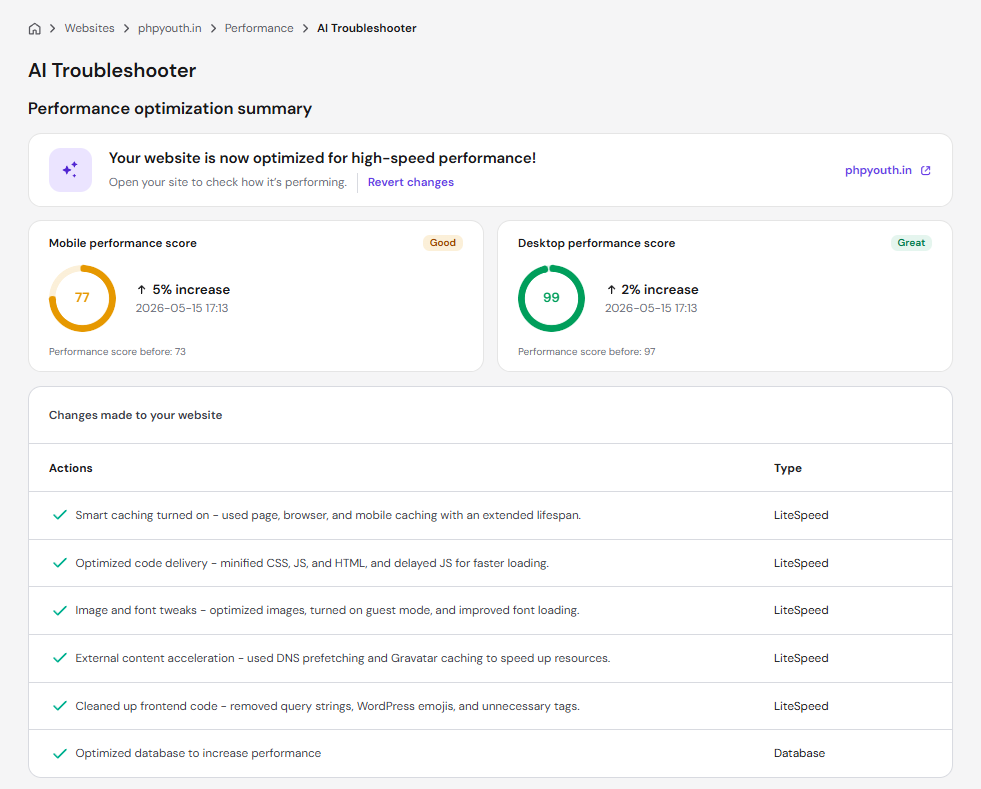
On client sites I manage through Hostinger, I’ve run Google PageSpeed Insights tests on fresh WordPress installs with a standard theme and no heavy plugins. Typical results:
- Desktop performance scores: consistently 88–95
- Mobile performance scores: 79–91 (varies based on image optimization)
- Time to First Byte (TTFB): under 200ms in most cases
- Uptime over 12 months: 99.97% on average across accounts I monitor
See the Latest Hostinger Deal
That’s not marketing copy; those are real numbers from real sites. The LiteSpeed web servers make a noticeable difference, especially combined with Hostinger’s built-in caching layer. Pages that would have loaded in 2.8 seconds on a generic host load in under 1.5 seconds on Hostinger without any extra optimization work.
One thing worth noting: performance does vary depending on which data center you select. I always choose the one closest to where my client’s audience is; they have servers in Europe, the US, Asia, India, and South America. Picking the right location matters more than most people realize.
The hPanel Dashboard: Honest Thoughts
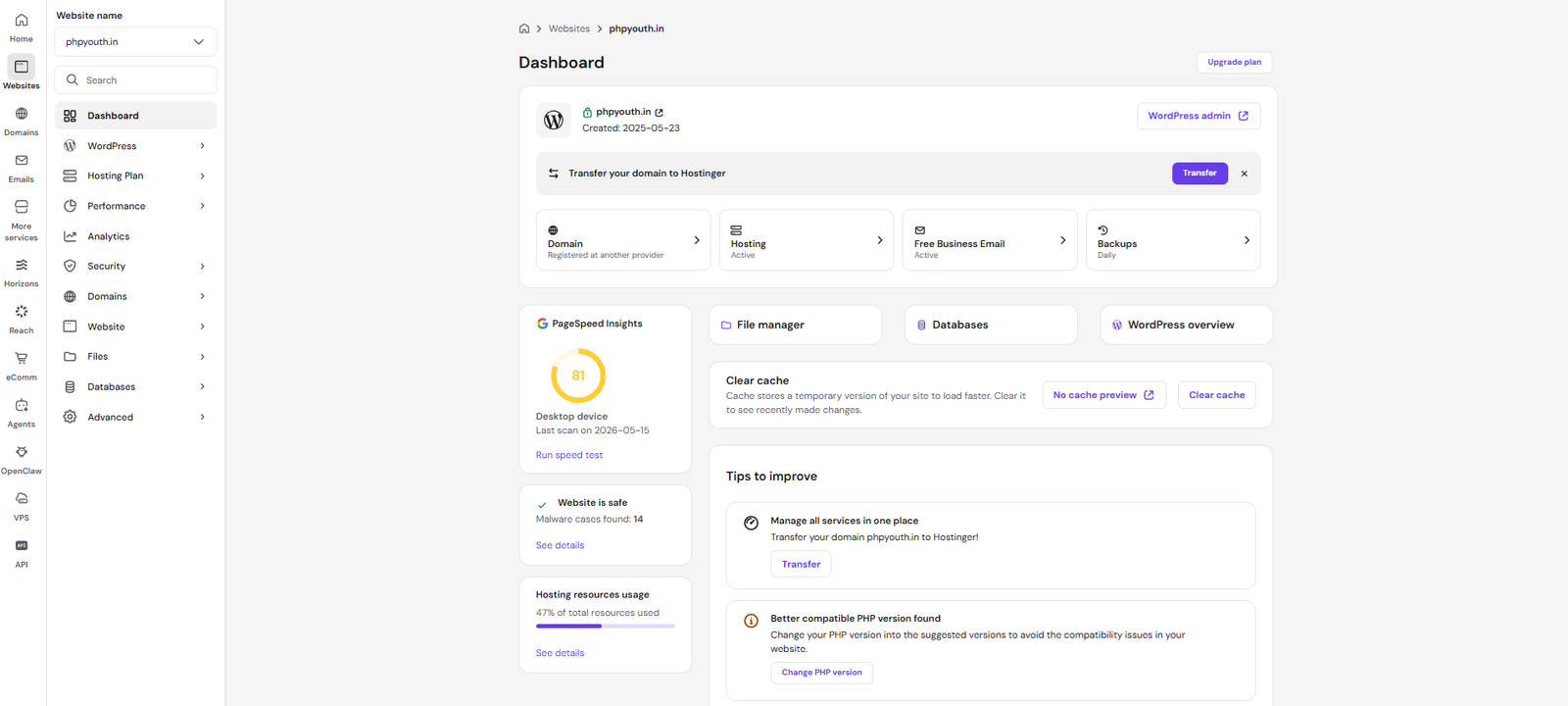
Hostinger doesn’t use cPanel. They built their own control panel called hPanel, and honestly? It’s better.
I say that, having spent years using cPanel across dozens of hosting accounts. cPanel is functional, but it’s cluttered and looks like it was designed in 2008. hPanel is clean, logically organized, and most tasks take fewer clicks.
Setting up a new website takes maybe five minutes. Installing WordPress is a single click. Creating an email account, adding a domain, managing DNS records — all of it is straightforward, even if you’ve never managed hosting before.
The one thing I’d flag: if you’re used to cPanel-specific features or you’ve built automated workflows around cPanel’s file structure, there’s a learning curve. But for anyone coming in fresh, hPanel is genuinely easy to use.
WordPress Integration
Hostinger has put real effort into being a strong WordPress host, and it shows.
They offer:
- One-click WordPress installation
- LiteSpeed Cache plugin pre-configured
- WordPress-optimized server settings out of the box
- Automatic WordPress updates (on managed plans)
- Staging environments on higher-tier plans
The LiteSpeed Cache integration is particularly worth mentioning. It’s free, it’s powerful, and when set up properly, it significantly reduces load times without you needing to pay for a separate caching solution. On managed WordPress plans, Hostinger configures it automatically for you.
Security: What’s Included vs. What You Still Need
Let me separate what Hostinger actually provides from what their marketing page implies.
What’s included:
- Free SSL certificate (via Let’s Encrypt, auto-renewing)
- DDoS protection at the network level
- Weekly or daily backups, depending on your plan
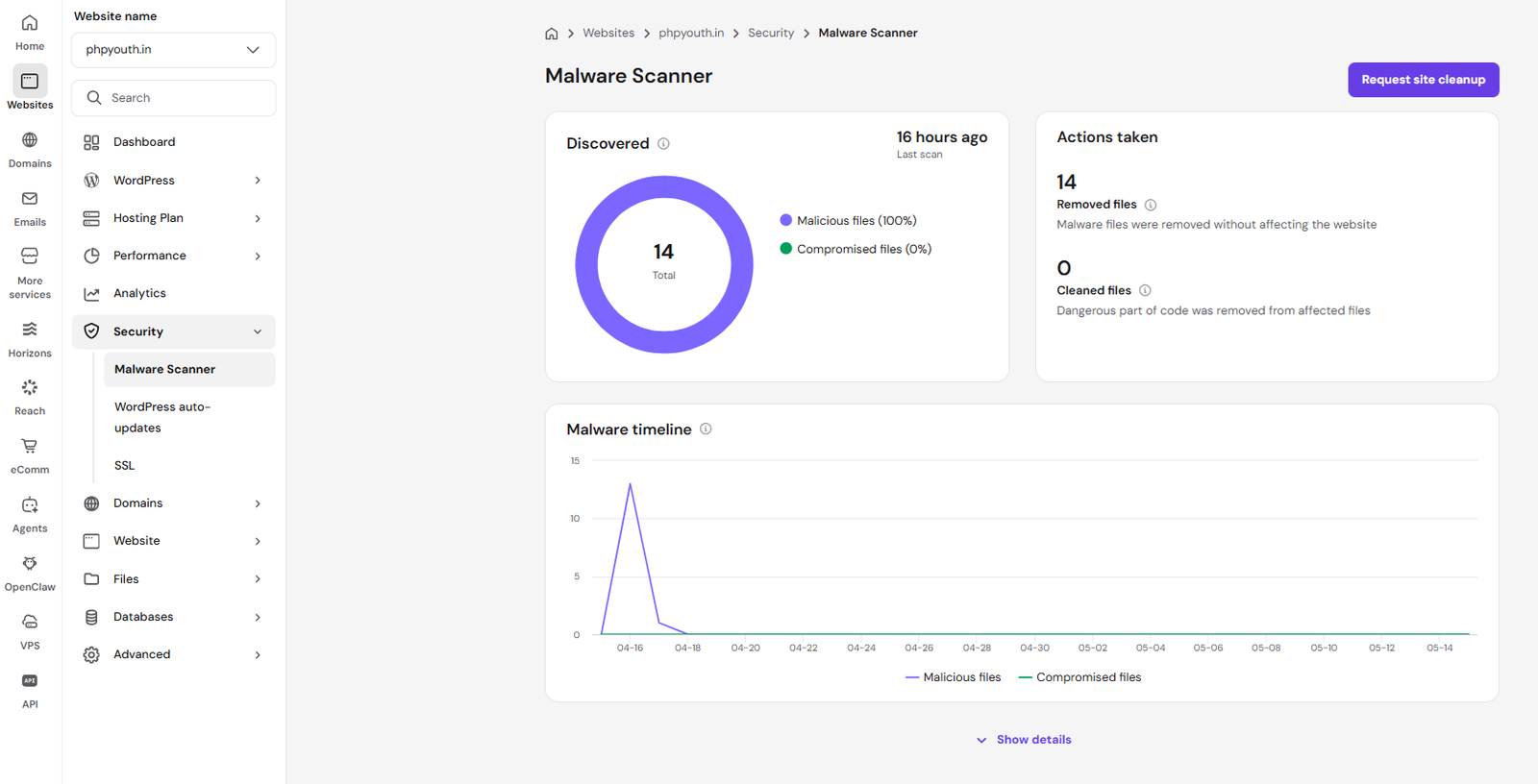
- Malware scanning on Business and above plans
What you’ll still want to add:
- A WordPress security plugin like Wordfence or Sucuri for deeper malware scanning and firewall rules at the application level
- Two-factor authentication on your Hostinger account (it’s available but not enforced — enable it the day you sign up)
- Regular manual backups of anything mission-critical, even if automated backups are enabled
The security setup is solid for a shared hosting environment. It’s not the same as what you’d get with a managed security service, but for most small and medium business websites, it’s more than adequate.
Customer Support: Where Hostinger Shines and Where It Doesn’t
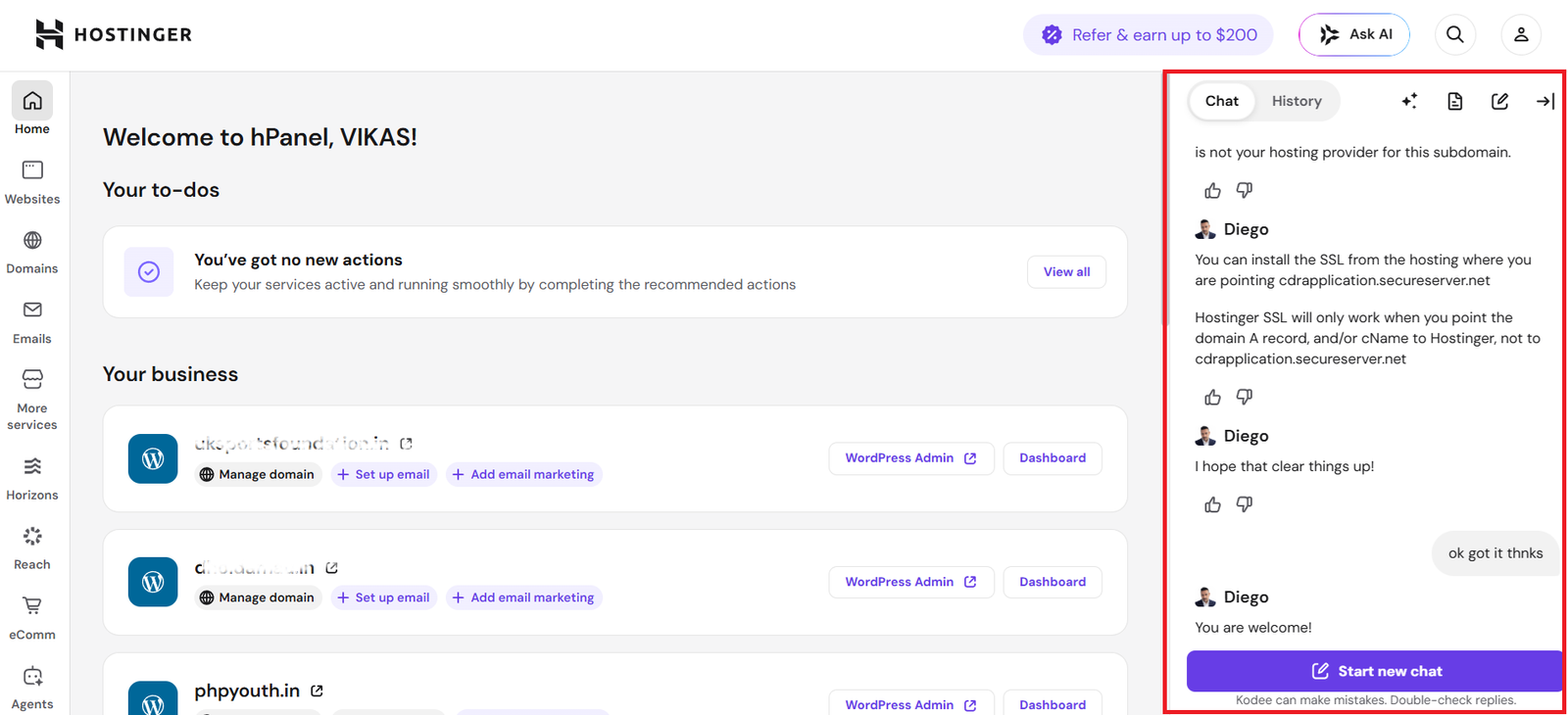
I’ll give them credit here: Hostinger’s live chat support has improved a lot over the last couple of years.
Response times are usually under two minutes during business hours. The support agents are generally knowledgeable — not just reading from a script — and I’ve had genuinely helpful interactions when troubleshooting server configuration issues for clients.
What they don’t offer: phone support. If you’re someone who needs to pick up the phone when something goes wrong, that’s a legitimate drawback. Hostinger is chat and ticket only.
For most issues I’ve run into — DNS propagation questions, email delivery problems, performance troubleshooting — the chat support resolved things faster than I expected. But if you’re running a business where downtime has serious financial consequences, and you want to be able to call a human being directly, keep that limitation in mind.
Want us to set up hosting?
Pricing: The Fine Print You Should Know
Hostinger’s advertised pricing is almost always the promotional rate for a multi-year commitment. Here’s what that means in practice:
If you sign up for 48 months (4 years), you get the headline price. Renewal after that period is at a higher rate — typically 2x to 3x the promotional price.
This isn’t unique to Hostinger; almost every major hosting provider does this. But it’s worth understanding before you sign up.
My recommendation: opt for a 24-month plan rather than the cheapest monthly option. You still get a good discount, your renewal price won’t be as painful, and you’re not locked in for four years if your needs change.
They also offer a 30-day money-back guarantee on most plans, so there’s low risk in trying it.
What I Don’t Like About Hostinger
I’ve been positive so far, so let me balance it out.
Renewal pricing: The jump from promotional to renewal rates can be jarring. Just be aware of what you’ll pay at renewal time before you commit.
No phone support: A real gap for some businesses. If your website going down causes immediate revenue loss, and you need to talk to someone right now, Hostinger’s chat-only support may not feel fast enough.
Shared hosting limitations: On the entry-level plan, you’re sharing server resources with other websites. Most of the time, you won’t notice. Occasionally, if a neighboring site gets a traffic spike, you might. It’s rare, but it happens in any shared hosting environment.
Email hosting is basic: Hostinger includes email with your plan, but it’s functional rather than impressive. If email is critical to your business operations, you’re better off pairing Hostinger’s web hosting with Google Workspace or Microsoft 365 for email.
How Hostinger Compares to the Competition
I covered this in more depth in our Best Hosting for Business Websites 2026 guide, but here’s a quick summary:
- Hostinger vs. Bluehost: Both are in a similar price range. Hostinger generally performs faster thanks to LiteSpeed servers. Bluehost has stronger WordPress brand recognition. I’d choose Hostinger for performance, Bluehost if your client specifically requests it.
- Hostinger vs. SiteGround: SiteGround has better performance on their higher-tier plans and genuinely excellent support. But it costs significantly more. For a small business website that doesn’t require premium infrastructure, Hostinger offers better value.
- Hostinger vs. HostGator: HostGator is also cheap, but I’ve found Hostinger more reliable and faster in my own testing. HostGator feels dated by comparison.
Final Verdict: Should You Buy Hostinger in 2026?
Hostinger in 2026 is legitimately good hosting. Not “good for the price” — just good.
The performance is fast, the uptime is reliable, the dashboard is the most beginner-friendly I’ve used, and the value for money is hard to beat. For a small business, a startup, a professional blog, or a WordPress site that doesn’t need cloud-level infrastructure, it covers every base.
The compromises — no phone support, promotional renewal pricing, basic email hosting — are real, but they’re also manageable. If you go in knowing what those limitations are, they won’t surprise you.
If you’re launching a new business website or moving away from an expensive host that’s charging you $15/month for equivalent features, Hostinger is absolutely worth trying. The 30-day money-back guarantee means the only thing you’re risking is the time to set it up.
My rating: 4.4 / 5
Get Hostinger – starts at $2.99/month
Frequently Asked Questions
Is Hostinger good for business websites?
Yes, especially for small to medium-sized business websites. It offers fast loading speeds, reliable uptime, and essential security features at an affordable price point. Larger businesses with complex infrastructure needs may want to consider Cloudways or a dedicated VPS instead.
Does Hostinger include a free domain?
Yes. Most Hostinger plans include a free domain name for the first year. After that, you’ll pay standard domain renewal rates.
Is Hostinger hosting fast?
Hostinger uses LiteSpeed servers and NVMe storage on higher plans, which makes it one of the fastest shared hosting options available. In independent benchmarks, it consistently performs well against competitors in the same price range.
What happens when Hostinger’s promotional price expires?
Your renewal price will be higher than the introductory rate. The exact amount depends on which plan you choose. Review the renewal pricing before signing up and factor it into your hosting budget.
Can I move my existing website to Hostinger?
Yes. Hostinger offers free website migration on some plans, and for WordPress sites, the process is straightforward using migration plugins. Their support team can also assist with migrations.
Does Hostinger support WooCommerce?
Yes. Hostinger supports WooCommerce on all plans. For WooCommerce stores with significant traffic, the Business Shared or Cloud Starter plan is recommended for better performance.
Need help deciding whether Hostinger is the right fit for your specific business website? Get in touch, and we’ll give you a straight answer based on your situation.
Also see: Best Hosting for Business Websites 2026 – Full Comparison
Discover more from Master WordPress with Free Tutorials & Guides
Subscribe to get the latest posts sent to your email.
1 thought on “Hostinger Review 2026: Is It Really Worth It for Business Websites?”
Pingback: Best Hosting for WooCommerce 2026: Top Picks for Online Stores