

Twitter just rolled out its most-awaited feature. Soon, Twitterati will be able to post longer tweets — up to 280 characters. At the moment, it is being tested with access to limited users only.
But there’s a workaround to try this new limit right away.
If you don’t want to wait, check out the steps below to post tweets using the 280-character update.
No need to install any apps or extensions in your browser. Just copy/paste the code.
Here are the instructions:
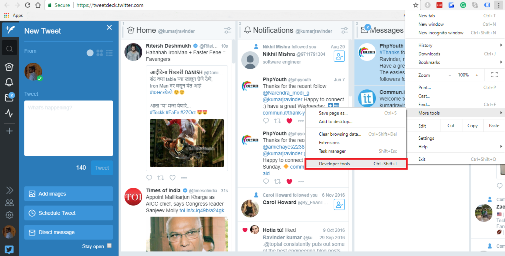
- Open Tweetdeck at tweetdeck.twitter.com.
- Open browser settings, hover over the More Tools(in Chrome) and select the Developer tools or Ctrl+Shift+I

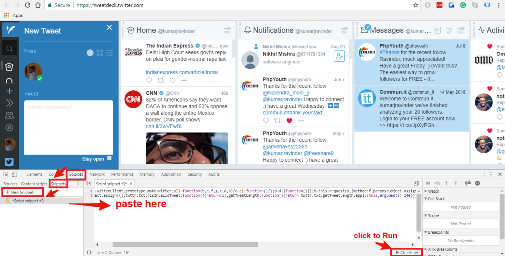
- Click Sources and then click on the Snippets.
- Once you open Snippets, click on the ‘New Snippet’ button and copy/paste the following code into the empty window on the right.
TD.services.TwitterClient.prototype.makeTwitterCall=function(b,e,f,g,c,d,h){c=c||function(){};d=d||function(){};b=this.request(b,{method:f,params:Object.assign(e,{weighted_character_count:!0}),processor:g,feedType:h});return b.addCallbacks(function(a){c(a.data)},function(a){d(a.req,"",a.msg,a.req.errors)}),b};
twttrTxt=Object.assign({},twttr.txt,{isInvalidTweet:function(){return!1},getTweetLength:function(){return twttr.txt.getTweetLength.apply(this,arguments)-140}});
Like the screenshot below:
- Click the Play button below to run the snippet.
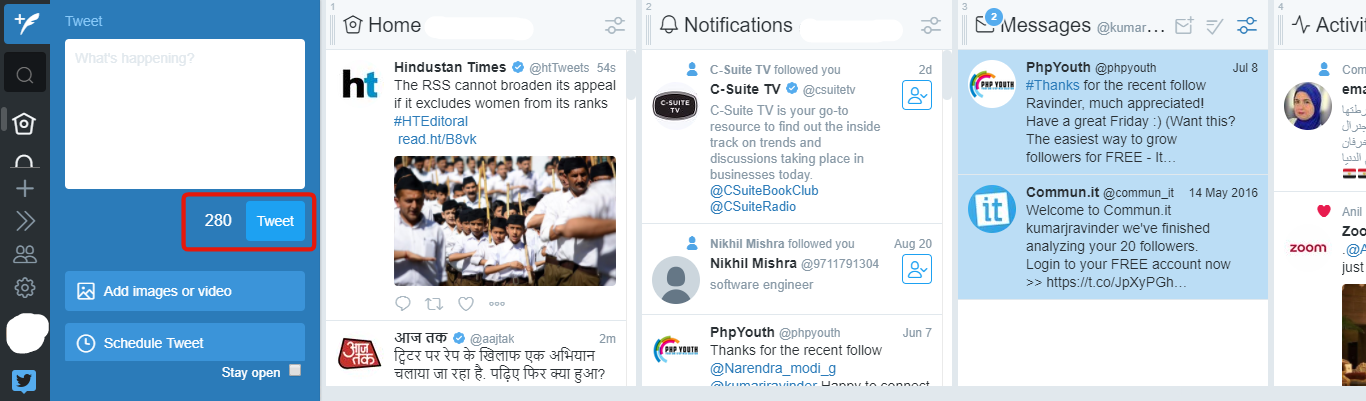
So friends, enjoy tweeting 280 characters


Discover more from Master WordPress with Free Tutorials & Guides
Subscribe to get the latest posts sent to your email.
