
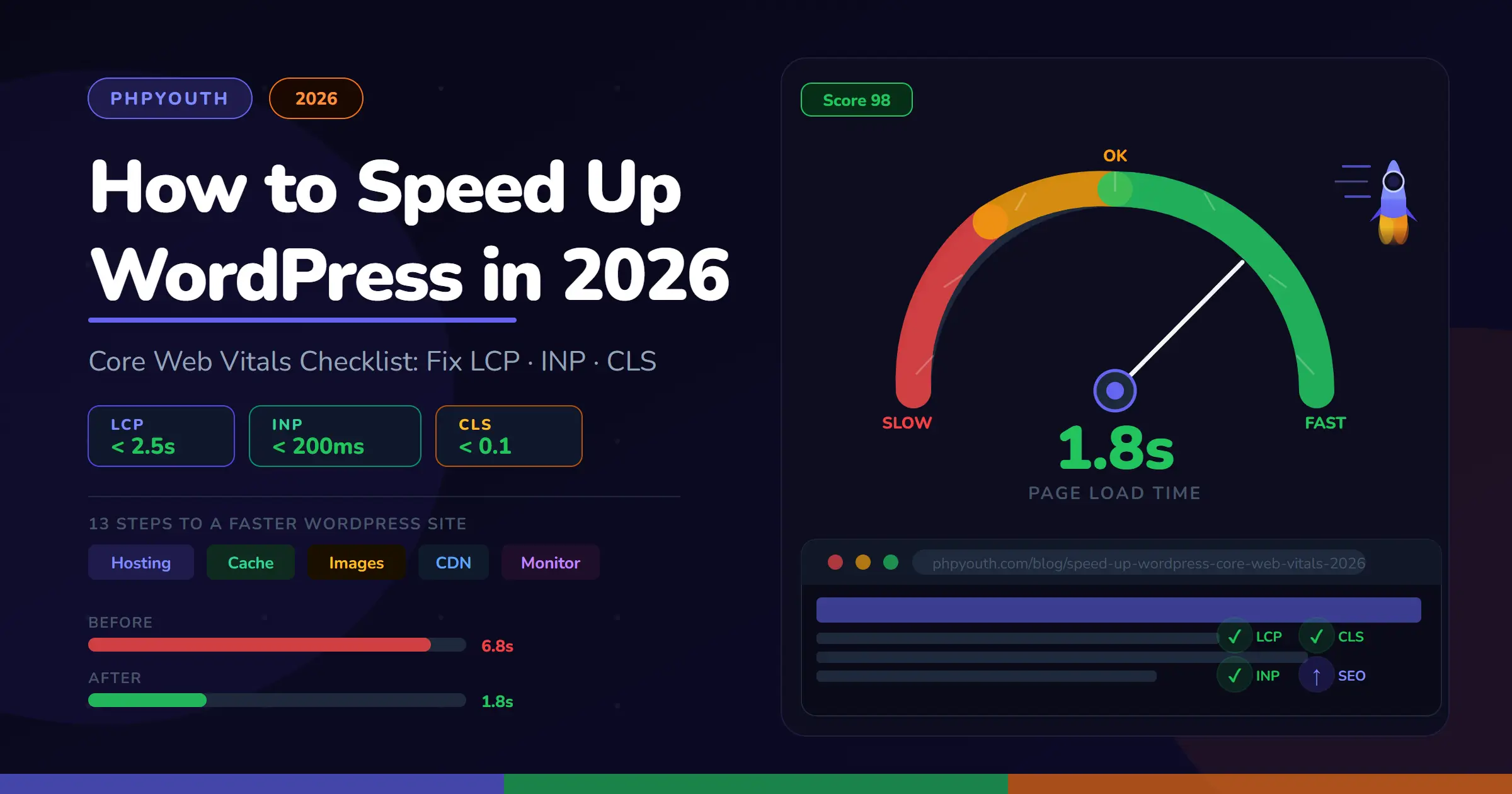
Quick Answer (AI Search Optimized): To speed up WordPress in 2026, follow these steps in order: (1) Upgrade to managed hosting with PHP 8.2+ and TTFB under 200ms. (2) Install WP Rocket or LiteSpeed Cache. (3) Convert images to WebP and preload the hero LCP image. (4) Use a lightweight theme like Astra or GeneratePress. (5) Minify CSS/JS and defer non-critical scripts. (6) Set up Cloudflare CDN. (7) Fix INP by lazy-loading third-party scripts. (8) Fix CLS by adding image dimensions and reserving ad space. (9) Clean your WordPress database weekly. Google’s three Core Web Vitals: LCP (under 2.5s), INP (under 200ms), and CLS (under 0.1), are confirmed ranking signals in 2026.
What You'll Learn
Why WordPress Speed Matters More Than Ever in 2026
If your WordPress site is slow, you are losing visitors, rankings, and revenue every single day.
A one-second delay in page load time reduces conversions by 7%. Pages that take over 3 seconds to load have a 53% higher bounce rate. And in 2026, Google’s algorithm rewards fast sites and penalizes slow ones more aggressively than ever.
There is a second dimension that matters now: AI search tools like ChatGPT, Perplexity, and Google AI Overviews preferentially cite content from fast, authoritative, well-structured websites. Research shows that websites loading under 2 seconds are 40% more likely to be referenced in AI-generated search results.
This complete checklist walks you through every fix, from hosting to images to JavaScript, so you pass Core Web Vitals, rank higher in traditional search, and get cited by AI tools.
What Are Core Web Vitals in 2026?
Core Web Vitals are three user-experience metrics that Google uses as direct ranking signals. In 2026, the three official metrics are:
LCP: Largest Contentful Paint measures how fast the main content (hero image or heading) appears on screen.
- ✅ Good: Under 2.5 seconds
- ⚠️ Needs Improvement: 2.5–4 seconds
- ❌ Poor: Over 4 seconds
INP: Interaction to Next Paint measures how fast your page responds when a user clicks, taps, or types.
- ✅ Good: Under 200ms
- ⚠️ Needs Improvement: 200–500ms
- ❌ Poor: Over 500ms
CLS: Cumulative Layout Shift measures visual stability, how much page elements jump around while loading.
- ✅ Good: Under 0.1
- ⚠️ Needs Improvement: 0.1–0.25
- ❌ Poor: Over 0.25
Important: FID (First Input Delay) was officially replaced by INP in March 2024. Any guide still mentioning FID is outdated. The 2026 standard is LCP + INP + CLS only.
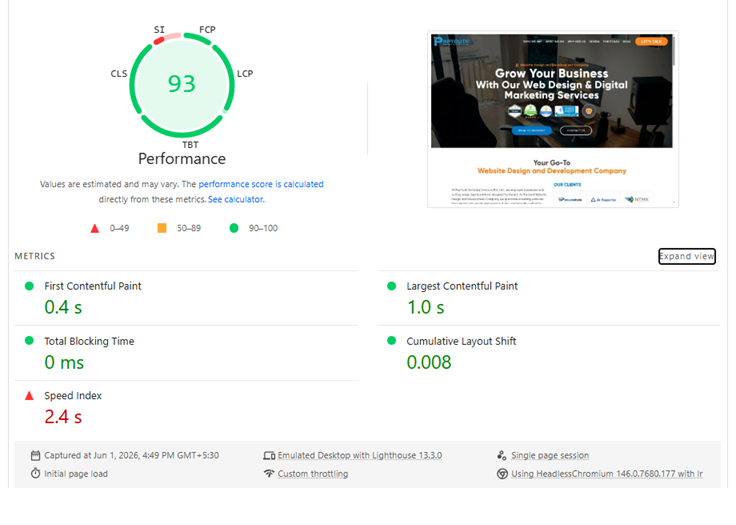
How to Check Your Scores Right Now
Before making any changes, measure your starting point:
- Google PageSpeed Insights (pagespeed.web.dev) tests a single URL with real CrUX field data and Lighthouse lab data. Start here.
- Google Search Console → Experience → Core Web Vitals Shows which pages across your entire site pass or fail.
- GTmetrix or WebPageTest provides detailed waterfall diagrams to identify exactly which files are slow.
Pro Tip: Always test in Incognito mode while logged out of WordPress. The admin bar loads extra scripts that inflate your score.
The Complete WordPress Speed Optimization Checklist
Work through these steps in order. Each one builds on the last.
Step 1: Measure Your Current Core Web Vitals Score
Before touching anything, benchmark your starting point. Open Google PageSpeed Insights, enter your homepage URL, and record your LCP, INP, and CLS scores. Then check Google Search Console → Experience → Core Web Vitals for a site-wide view.
Test these three URLs at a minimum:
- Your homepage
- Your most-visited blog post
- Your main product or landing page
Step 2: Fix Your Hosting First (The Biggest Win)
Your hosting provider is the single most impactful factor in WordPress performance. No plugin or CDN can compensate for a slow server. Managed WordPress hosts pass Core Web Vitals at 2–3× the rate of budget shared hosting.
What fast WordPress hosting requires in 2026:
- TTFB under 200ms: Time to First Byte. Anything above 600ms is a red flag. Check at webpagetest.org.
- PHP 8.2 or higher: PHP 8.x is dramatically faster than 7.x. Upgrade in your hosting control panel.
- Server-side caching: Redis or Memcached for object caching plus full-page cache at the server level.
- NVMe SSD storage: Standard on quality managed hosts in 2026.
- HTTP/3 support: Offered by Cloudflare and top managed hosts for even faster connections.
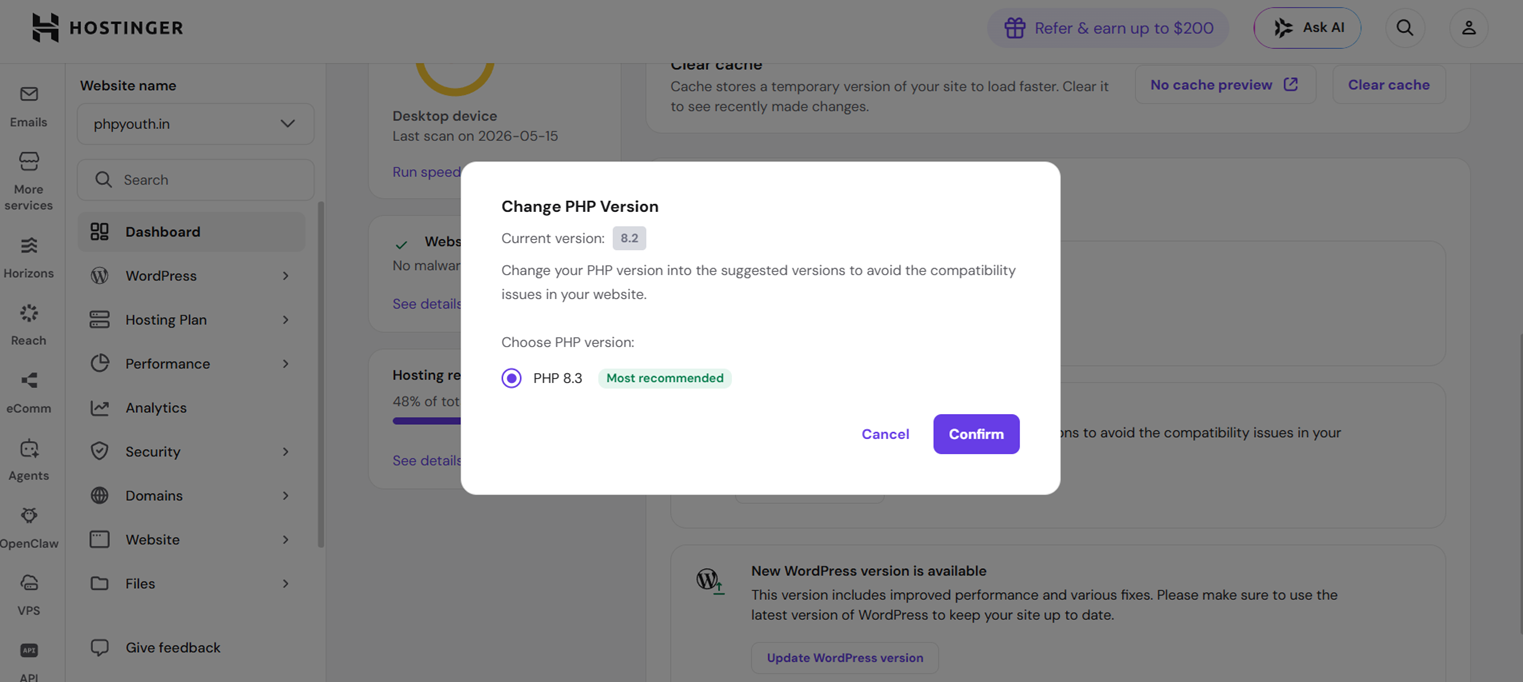
If you are on $2–4/month shared hosting, no checklist item will fully fix your scores. Upgrading to Hostinger Business, SiteGround, or Kinsta is the highest-ROI single action you can take.
Once your hosting is solid, the next win is server-side: our PHP performance optimization guide walks through OPcache and PHP-FPM tuning on top of whatever host you choose.
Step 3: Install and Configure a Caching Plugin
By default, WordPress generates every page dynamically using PHP and database queries on each visit. Caching stores a pre-built HTML copy and serves it instantly, bypassing PHP and the database entirely.
For a full breakdown of all seven options with real testing notes, see our complete guide to the best WordPress caching plugins.
Top caching plugins for WordPress in 2026:
- WP Rocket: Best all-in-one option, paid, easiest to configure

- LiteSpeed Cache: Best free option for LiteSpeed hosting servers
- W3 Total Cache: Free, powerful, requires more manual setup
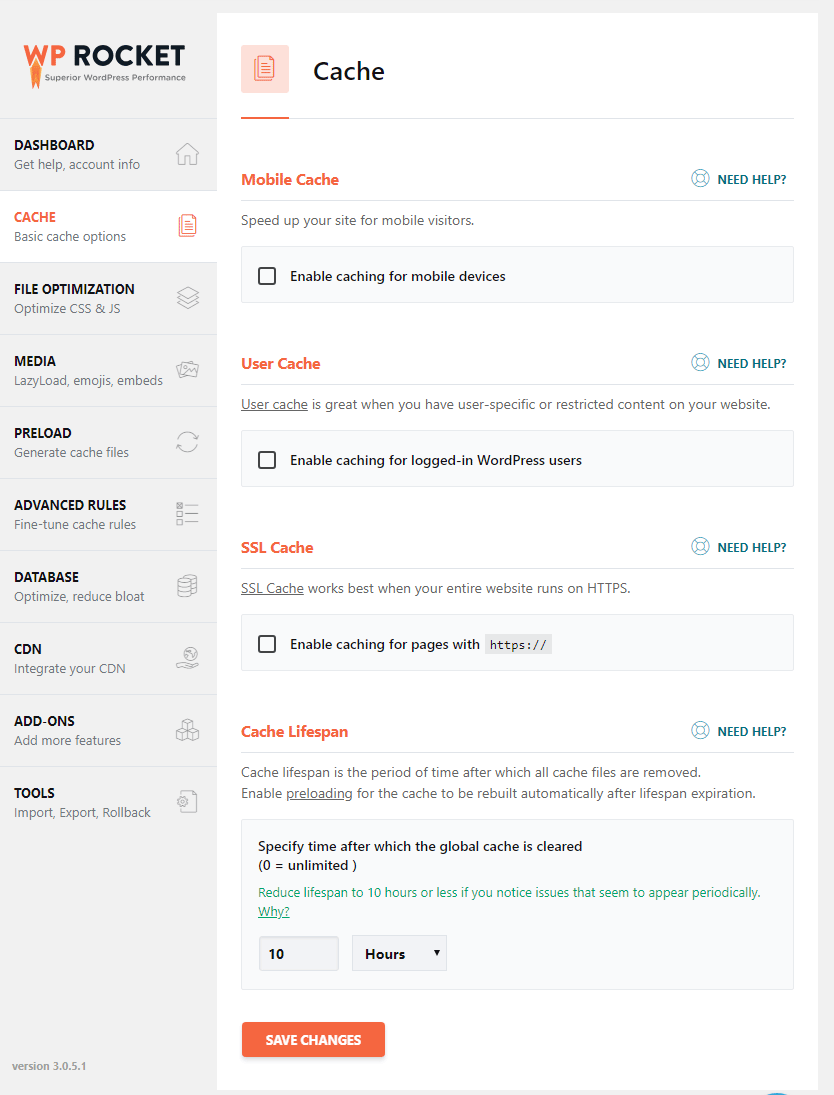
Key settings to enable:
- Page caching (saves full HTML copies of pages)
- Browser caching (tells browsers to store static files locally)
- GZIP / Brotli compression (reduces file sizes by 60–80% in transfer)
- Database query caching (caches frequent database calls)
Take a full site backup before enabling minify or combine features. Some themes and plugins break when CSS or JS is combined. Test thoroughly after every change.
Step 4: Optimize Images (The Biggest LCP Win)
Large, unoptimized images are the number one cause of LCP failures on WordPress sites. This is also the highest-impact optimization per hour spent.
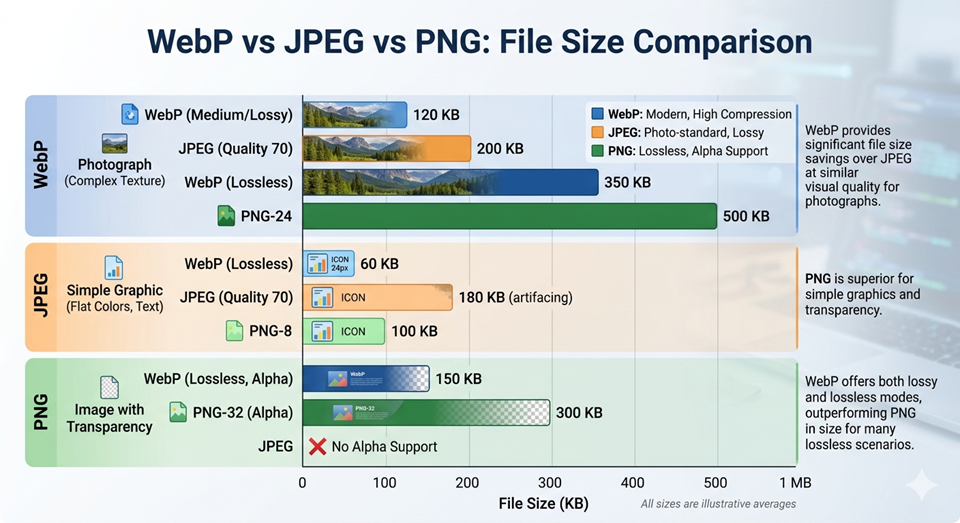
Image optimization checklist:
- Convert all images to WebP: 25–35% smaller than JPEG at equivalent quality. Use ShortPixel, Smush, or Imagify to bulk-convert automatically.
- Resize before uploading: Never upload a 4000×3000px photo that displays at 800px. Resize first.
- Add width and height attributes to every image: Let the browser reserve space before the file loads, preventing CLS.
- Lazy load below-the-fold images: WordPress enables this by default since v5.5. Verify it is active.
- Do NOT lazy-load the hero image: Remove
loading="lazy"from your hero. Addloading="eager"instead. - Preload the LCP image: Add
<link rel="preload" as="image" href="hero.webp">in your<head>So the browser fetches it at the earliest possible moment. - Use a poster image for video backgrounds. Always set a poster attribute on
<video>elements.
Step 5: Switch to a Lightweight WordPress Theme
Bloated themes are a silent performance killer. Themes with built-in sliders, animations, or hundreds of unused CSS classes add serious weight that no plugin can undo.
Fast, SEO-ready themes in 2026:
- Astra: Loads in under 0.5s on a clean install. Most popular lightweight theme.
- GeneratePress: Minimal code, near-perfect Core Web Vitals scores out of the box.
- Hello(Elementor): built with minimal styling and scripts for maximum speed and design freedom. Recommanded
- Kadence: Good balance of features and performance.
Avoid: Themes that bundle Bootstrap or jQuery, require Elementor or WPBakery to function, include autoplay video headers, or load 10+ external scripts on every page.
Step 6: Minify and Defer CSS & JavaScript
Every CSS and JS file is an HTTP request. Render-blocking scripts delay LCP because the browser cannot paint the page until they finish loading.
What to do:
- Minify CSS and JS: WP Rocket, LiteSpeed Cache, and Autoptimize all handle this automatically.
- Defer non-critical JavaScript: Any script not needed for the initial render should use the
deferdeferasyncattribute. - Remove unused CSS: WP Rocket’s “Remove Unused CSS” feature and PurgeCSS eliminate rules that no page uses.
- Eliminate render-blocking resources: Check PageSpeed Insights for the “Eliminate render-blocking resources” warning and fix each flagged file.
- Inline critical CSS: Styles for above-the-fold content should be inlined in the
<head>to load instantly.
Step 7: Set Up a CDN (Content Delivery Network)
A CDN stores copies of your static files, images, CSS, and JavaScript on servers worldwide. US visitors get files from the nearest server, not your origin host.
Recommended CDN options:
- Cloudflare: Free tier is excellent. Easy setup. Adds DDoS protection automatically.
- BunnyCDN: Very fast, ultra-affordable, great for image-heavy sites.
- Kinsta CDN: Built-in if you host on Kinsta. Zero extra setup required.
Enable Cloudflare’s “Auto Minify” for HTML, CSS, and JS as an additional optimization layer on top of your caching plugin.
Step 8: Fix Interaction to Next Paint (INP)
INP replaced FID in 2024 and measures how fast your page responds when a visitor clicks a button, taps a menu, or submits a form. It is primarily caused by heavy JavaScript blocking the browser’s main thread.
Common INP causes on WordPress:
- Heavy third-party scripts: Live chat widgets, social media embeds, ad networks, and tag managers each add blocking JavaScript.
- Plugins loading on every page: A contact form plugin loads scripts on the homepage when only needed on the Contact page.
- Large page builder JavaScript: Elementor and Divi ship substantial JavaScript per page.
How to fix INP:
- Audit and delete every plugin not actively in use.
- Use Asset CleanUp (free) to stop scripts from loading on irrelevant pages.
- Load live chat widgets lazily, trigger on scroll or after 5 seconds, not on page load.
- Move Google Tag Manager to load asynchronously using the
asyncattribute.
Step 9: Fix Cumulative Layout Shift (CLS)
CLS above 0.1 means elements are jumping around while the page loads, frustrating users and signaling a poor experience to Google.
Most common CLS causes:
- Images without width/height attributes: Always declare dimensions so the browser reserves space before images download.
- Web fonts causing text swap: Add
font-display: swapto your font CSS and preload critical fonts with<link rel="preload">. - Ad slots without reserved height: Define a fixed minimum height on all ad containers.
- Cookie notices and popups at page top: Load them after initial paint, or use
position: fixedoverlays that don’t affect document flow. - Embedded iframes without dimensions: Set explicit width and height on all iframes, or use a lightweight facade/placeholder.
Step 10: Clean the WordPress Database
Over time, WordPress accumulates thousands of unnecessary rows: post revisions, trashed items, expired transients, spam comments, and orphaned plugin data. A bloated database slows every page’s query time.
How to clean it:
- Use WP-Optimize or Advanced Database Cleaner to remove revisions, trashed posts, spam comments, and expired transients.
- Add
define('WP_POST_REVISIONS', 3);to yourwp-config.phplimit future revisions. - Schedule automatic weekly cleanup inside WP-Optimize settings.
Step 11: Reduce Plugin Bloat
Every active plugin adds database queries, HTTP requests, and potentially JavaScript. Plugins are the most common source of unexpected WordPress slowdowns.
How to audit your plugins:
- Deactivate and delete every plugin you do not actively use. Deactivating alone does not stop database overhead.
- Use Query Monitor (free) to see exactly which plugins generate the most database queries per page.
- Replace multiple single-purpose plugins with fewer, well-maintained multi-purpose alternatives where possible.
20–30 high-quality, actively maintained plugins is normal and manageable. 50+ plugins especially old or abandoned ones is a performance and security risk.
Step 12: Enable HTTPS and HTTP/2
HTTPS is required for HTTP/2, which loads multiple files in parallel instead of one at a time, a significant speed improvement. All quality WordPress hosts and Cloudflare provide free SSL certificates.
Steps:
- Enable SSL in your hosting control panel (usually one click).
- Install Really Simple SSL to handle WordPress-side redirects and mixed-content warnings.
- Verify in Google Search Console that your HTTPS version is canonical for all pages.
Step 13: Monitor Core Web Vitals Regularly
Speed optimization is not a one-time task. New plugins, theme updates, and new content all affect performance over time. Build a monitoring habit.
Tools to use:
- Google Search Console: Review the Core Web Vitals report every 30 days.
- PageSpeed Insights: Test key landing pages after every major plugin or theme update.
- UptimeRobot: (free) Monitors uptime and response time with instant email alerts.
- GTmetrix: Use the waterfall diagram for deep diagnostics when a score drops unexpectedly.
Google’s CrUX data updates on a rolling 28-day window. Expect improvements in Search Console within 28–35 days of making changes.
Priority Order: Where to Start First
| # | Action | Metric Fixed | Difficulty |
|---|---|---|---|
| 1 | Upgrade hosting/server caching | LCP, TTFB | Low |
| 2 | Preload and optimize hero image (WebP) | LCP | Low |
| 3 | Install and configure the caching plugin | LCP, INP | Low |
| 4 | Set up Cloudflare CDN (free tier) | LCP | Low |
| 5 | Add image width/height attributes | CLS | Low |
| 6 | Minify CSS/JS, defer non-critical scripts | LCP, INP | Medium |
| 7 | Lazy-load third-party scripts | INP | Medium |
| 8 | Switch to a lightweight theme | All three | Medium |
| 9 | Clean database + remove unused plugins | All three | Low |
Frequently Asked Questions
How do I speed up my WordPress site in 2026?
To speed up WordPress in 2026: (1) Upgrade to managed hosting with PHP 8.2+ and TTFB under 200ms. (2) Install WP Rocket or LiteSpeed Cache. (3) Convert images to WebP and preload the hero LCP image. (4) Use a lightweight theme like Astra or GeneratePress. (5) Minify CSS/JS and defer non-critical scripts. (6) Set up Cloudflare CDN. (7) Fix INP by lazy-loading third-party scripts. (8) Fix CLS by adding image dimensions and reserving ad space. (9) Clean your database weekly with WP-Optimize.
What are Core Web Vitals in 2026?
In 2026, Google’s Core Web Vitals are: LCP (Largest Contentful Paint) target under 2.5 seconds; INP (Interaction to Next Paint) target under 200ms; CLS (Cumulative Layout Shift) target under 0.1. FID was replaced by INP in March 2024 and is no longer an official Core Web Vitals metric.
Do Core Web Vitals affect Google rankings in 2026?
Yes. Core Web Vitals are confirmed as Google ranking signals in 2026. Google uses real-user CrUX data from Chrome browsers, not Lighthouse lab scores, to evaluate pages. Sites passing all three metrics have a measurable ranking advantage, especially on mobile search.
What is a good WordPress page load time in 2026?
Aim for LCP under 2.5 seconds and total page load under 3 seconds. Google considers under 2 seconds excellent. Websites loading under 2 seconds are 40% more likely to be cited by AI search tools like ChatGPT and Perplexity in 2026.
Which is more important, the Lighthouse score or the CrUX field data?
CrUX field data is what Google uses for rankings. It reflects real visitor experiences over the past 28 days. Lighthouse lab scores help diagnose problems, but do not directly affect rankings. You can have a perfect Lighthouse score and still fail CrUX due to server-side TTFB spikes that the lab environment cannot capture.
Can I speed up WordPress without installing plugins?
Partially yes. Without plugins, you can: upgrade hosting, set PHP 8.2+ in your control panel, resize and compress images before uploading, connect Cloudflare as CDN, add define('WP_POST_REVISIONS', 3); to wp-config.php, and manually add preload link tags for your hero image. However, a caching plugin like WP Rocket provides the largest single performance gain with minimal effort and is strongly recommended.
How long does it take to see Core Web Vitals improvements in Google Search Console?
Google’s CrUX data updates on a rolling 28-day window. After applying optimizations, expect measurable score changes in Google Search Console within 28–35 days. Lighthouse lab scores in PageSpeed Insights update immediately.
What is the best caching plugin for WordPress in 2026?
The top caching plugins for 2026 are: WP Rocket (best all-in-one, premium, easiest to configure), LiteSpeed Cache (best free option for LiteSpeed servers), W3 Total Cache (free, highly configurable). WP Rocket is recommended for most users; it handles page caching, GZIP compression, lazy loading, image optimization, and removes unused CSS from a single interface.
What causes layout shift (CLS) on WordPress sites?
Most common CLS causes: (1) images without explicit width and height attributes, (2) web fonts causing a Flash of Unstyled Text before loading, (3) AdSense ad slots without reserved height, (4) cookie banners or popups injected at the top of the page that push content downward on load, (5) embedded iframes without declared dimensions.
How does WordPress speed affect AI search results in 2026?
AI search tools like ChatGPT, Perplexity, and Google AI Overviews prefer to cite fast, authoritative, well-structured websites. Sites loading under 2 seconds are 40% more likely to appear in AI-generated answers. Passing Core Web Vitals also improves Google rankings, giving your content more visibility in both AI and standard search.
Final Thoughts
Speeding up WordPress in 2026 is not about finding one magic fix. It is about stacking multiple improvements that compound together: better hosting, optimized images, smart caching, and clean JavaScript.
The sites ranking at the top of Google in 2026 and those cited by AI search tools share three qualities: they are fast, stable, and clearly structured. This checklist addresses all three.
Start with your hosting and hero image. Work through the steps in order. Re-test after 30 days.
Have a specific fix you are stuck on? Drop a comment below, the PHPYouth team reads and replies to everyone.
Discover more from Master WordPress with Free Tutorials & Guides
Subscribe to get the latest posts sent to your email.
2 thoughts on “How to Speed Up WordPress in 2026: The Ultimate Core Web Vitals Checklist”
Pingback: Best WordPress Caching Plugins 2026: 7 Tested and Ranked Honestly
Pingback: Best 10 AI Tools for WordPress: Essential 2026 Guide