

Hello Friends, how are you? I hope all are feeling well, safe, and at home in this pandemic. I also want to say sorry for not publishing an article in the last 75 days. So today we started again with a new topic, can’t say new but yes it’s who don’t know. Today, we learn how to make a duplicate/Clone/Copy Database using PHPMyAdmin.
Why Do We Need to Copy a Database Using PHPMyAdmin?
But first, we will discuss why we need to copy the database using PHPMyAdmin. Sometimes you face this situation where you are unable to clone a WordPress site on the same server due to its size, and all cloning tools fail to do this; they want to upgrade the tool first to the premium/PRO version. LOL, actually, I have faced the same situation as well. That website I tried to clone had a 1GB file and a 700MB Database backup. So that’s the reason I write this article, so no one can face this torture.
Benefits of Copying a Database Using PHPMyAdmin
From this article, we will not need to download and then upload the database again on the same server for cloning. Duplicate/Clone/Copy Database using PHPMyAdmin will save you a lot. So let’s start, follow the steps I have mentioned.
- Log in to your cPanel
- Click PHPMyAdmin
- Select the Database you want to make a copy or duplicate.
- Once you select the database, click on the Operations tab.


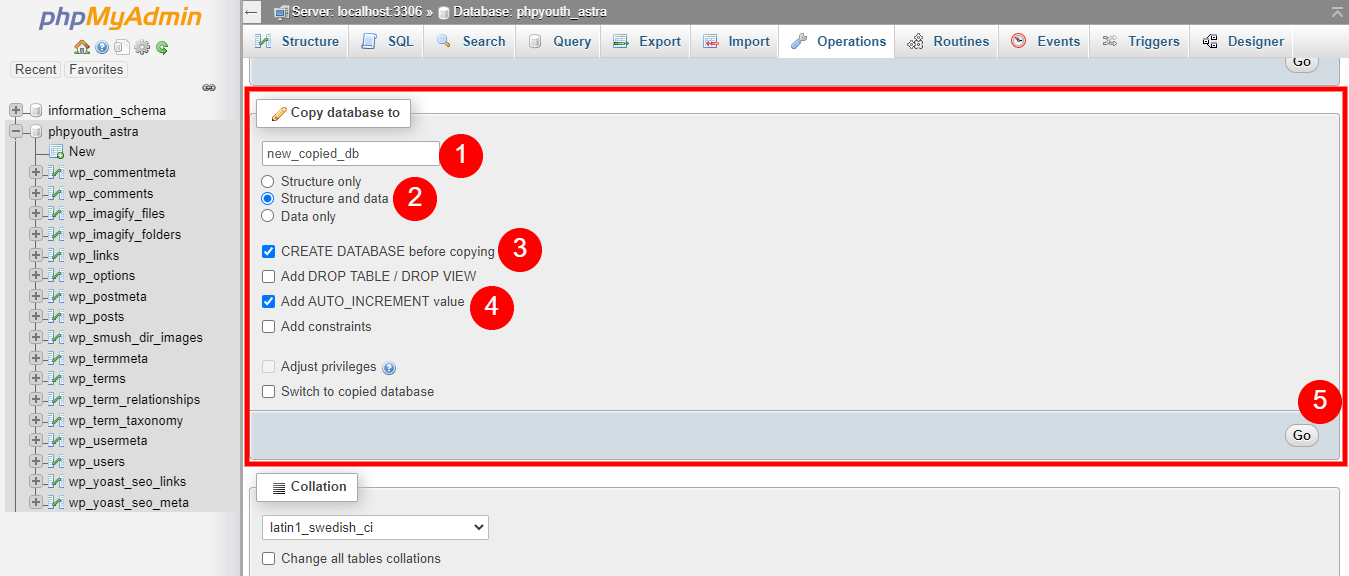
- Once the Operations tab opens, scroll down to the section where it says Copy Database to:
-
- Type the name of your new database.
- Select Structure and Data to copy everything.
- Then select CREATE DATABASE before copying to create a new database
- At last, Select Add AUTO_INCREMENT value
- Finally hit the Go button, see the screenshot below screenshot

-
- Once you hit the Go button, your database will be successfully copied to the new database. Check the screenshots


Important Note: After Copying Database
During the process, the Username and Password for the Database were not generated, so you have to create a new Username and Password for the Database and assign all privileges.
PS: How to add a WordPress Administrator from the MySQL Database
Conclusion
So friends, if this article is really helpful for you, then please share your thoughts and your experience while doing this in the comment box. I will be waiting. Keep learning and sharing.

Discover more from Wordpress Tutorial for Beginner's
Subscribe to get the latest posts sent to your email.

1 thought on “How to make Duplicate/Clone/Copy Database using PHPMyAdmin”
very informative